TLA 4 Stage 2 All Levels Solution

That Level Again 4 Stage 2 all levels that are solved in this page:
- Don’t know How to move? Use a Hint!
- Guess it’s time to put everything in its place
- What’s next… You need to look around
- Wait, We need to take a pause.
- How do you jump on it?
- Hmm. Something’s wrong
- You need to go down
- You need to reach it with your hand
- Are you missing something? Be more persistent
- By the way, I wanted to send you something but wifi doesn’t work! Do something about it
- Great Just send
- I have hidden the key, but not under the mat
- My test game
- There were many different attempts
- Urgent Task-Save This
- what’s next
- Ouch! One more button?
- Tilt the device to move
- Securely Hidden
- Put all the ball on the dots
- How do you go out?
- we need to move the icon…
- Break It.
Just Scroll below to find the Guide.
Click here All Other Stages of That Level Again 4
TLA 4 Stage 2 (Video is below Hints):
- That Level Again 4- Don’t know How to move? Use a Hint!
Use finger to life hint button and push the character using the hint button. (video below)
- That Level Again 4- Guess it’s time to put everything in its place
Now you have to put all the buttons in their place, So fix Hint button in the upper left corner where it should be.
- That Level Again 4- What’s next… You need to look around
Tilt your phone, so that the game screen moves slightly up and you can see Arrow button, Click on it 3-4 times to move it up. Then use that arrow to move character all the way to the right, by making extra space tilting device.

- That Level Again 4- Wait, We need to take a pause.
Don’t do anything just take a pause of 5-10 seconds.
- That Level Again 4- How do you jump on it?
Use the resume button to jump and go closer to the Pause button:

- That Level Again 4- Hmm. Something’s wrong
Zoom in on the pause button to see the hidden text, and follow it i.e. Just lock/unlock the device or turn off the screen and turn it on again (no need to close game or power down the phone)
- That Level Again 4- You need to go down
Just rotate phone 90 degrees, In the direction when you use phone usually.
- That Level Again 4- You need to reach it with your hand
Pull the block with a spike as shown in the image: 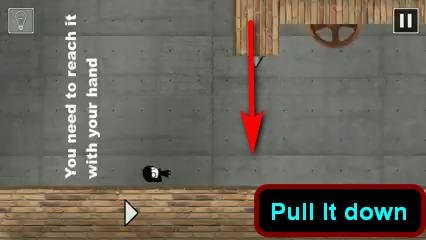
- That Level Again 4- Are you missing something? Be more persistent
Tap in the left bottom corner as shown: 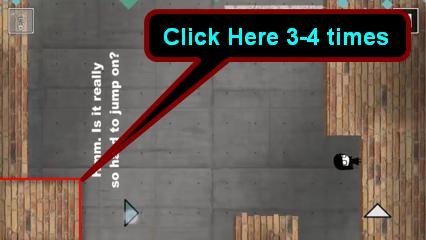
- That Level Again 4- By the way, I wanted to send you something but wifi doesn’t work! Do something about it
Turn on/off Wifi, you will receive a mail.
- That Level Again 4- Great Just send
Pull the dropdown menu and turn the device 360 degrees until you fill that symbol completely (do not press on it, that is a trap!) and move forward.
- That Level Again 4- I have hidden the key, but not under the mat
Pull the drop-down menu as you did in the previous level but pull it further so that you can have that hidden key.
- That Level Again 4- My test game
do not waste time to pop balls, just pop the door and you are good to go: 
- That Level Again 4- There were many different attempts
Go from above of the pipes (video below)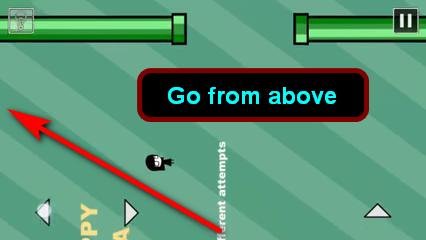
- That Level Again 4- Urgent Task-Save This, Lick the device
Just step on the button and slide your finger over the screen (Not tongue!) and press Tick in next screen. And screenshot that written (FAGEE)- you will require this code in stage 3.
- That Level Again 4- what’s next
Jump through the wall as shown, there is a tunnel through it. 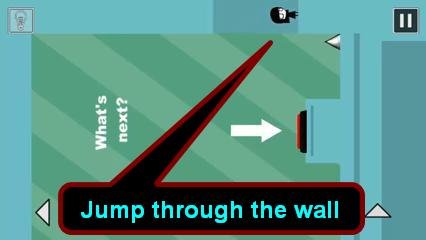
- That Level Again 4- Ouch! One more button?
Jump on that button and press and hold down button to press it completely.
- That Level Again 4- Tilt the device to move
Tilt device to move, you will find that you are stuck, Go back to previous levels and try to find your way out. You will find that only way out is through the pipes, so enter in any of the bottom pipes that will guide you to the next level. 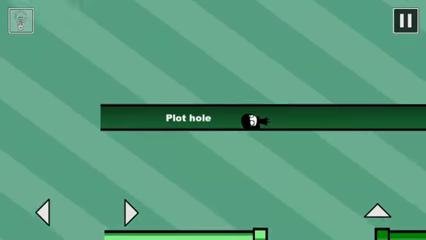
- That Level Again 4- Securely Hidden SBL
Click and hold on 4 screws of the SBL board:
- That Level Again 4- Put all the ball on the dots
that is very hard, but you just have to put the device on the table and spin it! the balls will move away from the center because of the centrifugal force.
- That Level Again 4- How do you go out?
Press the back button of your device
- That Level Again 4- we need to move the icon…
Touch and hold on the icon to detach it and then Go below the icon, and then jump, the icon will separate.
- That Level Again 4- Break It
Move icon to the left below the spike on the platform and break it with the help of spike, then move the ball to the platform. 
Video solution step by step:
If you have any problem/suggestion you can comment on this post I will surely help you.
I love how TLA4 uses every input method the phone has! The sound-related levels are especially clever. It reminds me of debugging audio routing issues. Sometimes headphones play from only one side. A quick left right speaker test can isolate whether it’s the cable, output setting, or the headphones themselves.
The accelerometer level is genius! It’s amazing how a phone game can teach you about device input. I work on browser-based hardware checks and the camera is another common pain point for remote workers. A quick camera test online before a video interview can prevent those embarrassing moments where you join with a blank screen or wrong camera selected.
Stage 2 really pushes you to use all your phone’s sensors! The wifi and tilt mechanics are so creative. That kind of hardware testing is exactly what we focus on too. Our browser microphone test uses the Web Audio API to show a live level meter so you know instantly if your mic is picking up sound before joining a call.
Stage 2 has so many creative puzzles, especially the centrifugal force one with the balls! I love discovering new puzzle games like this. I keep a curated collection of best free online games that includes similar creative titles if anyone wants more challenges.
These puzzles require such a mix of skills – tilting, quick reactions, memory of previous levels. The ‘Urgent Task-Save This’ level is clever since it ties into stage 3! Games like this are why I enjoy short cognitive challenges – they keep different parts of your brain active. Brain Speed Lab has a similar variety of quick tests for reaction, memory, and focus if you enjoy this kind of mental workout.
These solutions are super helpful – the ball level is definitely the trickiest part of Stage 2! I love how mobile puzzle games keep finding creative ways to use phone features like tilting and screen rotation. For another challenging mobile puzzle that relies on pure logic rather than phone tricks, check out Arrows Puzzle hard levels where the difficulty comes from figuring out the right arrow clearing order.
These step-by-step hints are really helpful for tricky puzzle levels like this one. That Level Again 4 has some creative challenges that make you think beyond the screen itself. For players who enjoy that kind of logical problem-solving, Arrows Puzzle Guide covers similar walkthrough content for another popular mobile puzzle game.
its impossible for the ball one, i cant even get an ad to skip it.
The ball one didn’t work for me either, and it’s not even letting me take a hint so ig it’s time to move to the next game due to me not being able to continue TwT
just tilt your device
There’s no door for me to pop on the new game level. I literally cannot beat it.
The “red wall” to the right of the character is the DAMN door.
its because of your phone screen ratio. try split screen on TLA.
lol brih lmfao lmao lmbo for ball puzle you just spin.
Yeah i agree
That Level Again 4- Put all the ball on the dots
Didn’t work for me
Only solution was to press hint and skip
Putalltheballsdidn’tworkforme
Me either, I tried all the ways to spin but the balls just don’t go where they should
Bruh I just did my best to get the balls into every side a bit and then spin so every ball could go to it’s own dot